
Panic mode
Emergency vault destruction from the GUI.
Panic mode wipes a vault's header so the encrypted content becomes mathematically unrecoverable. Use this when you need to destroy a vault instantly without leaving forensically-recoverable artefacts.
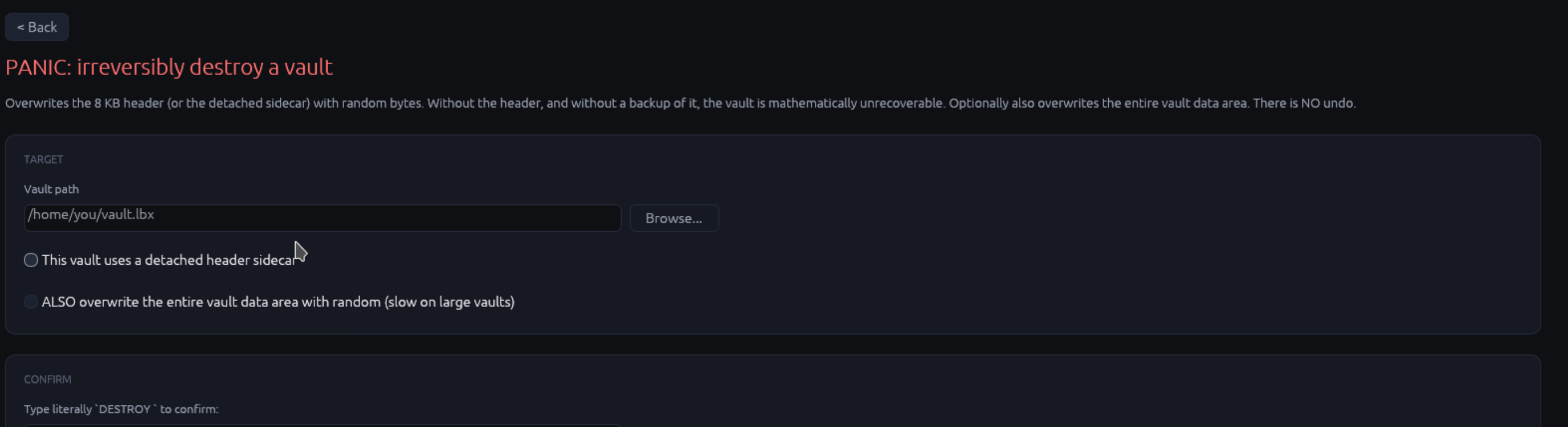
What panic mode does
Two destruction modes, controlled by checkboxes:
| Mode | What it does | When to pick |
|---|---|---|
| Wipe header (default) | Overwrites the 8 KiB header (or the .hdr sidecar) with random bytes. Without the header, the vault file is opaque random data; no keyslots to attack, no MVK material left. The encrypted data IS still on disk but unreadable. |
Fast destruction; preserves disk space if you want to keep the encrypted blob for forensic confusion |
| Wipe entire vault file | Above, plus overwrite the entire .lbx data area with random bytes. Then truncate to zero length. |
Full destruction; takes time proportional to vault size |
Both modes:
- Wipe the
.hdr(if detached) AND any backup.hdrfiles in the same directory - Wipe the
.anchorsidecar - Wipe the
.hybridsidecar (for hybrid-PQ vaults) - Wipe the
.kyberseed file IF you tick "Wipe associated.kybertoo"
Why this is mathematically unrecoverable
Without the 8 KiB header you have:
- No magic bytes (
LBXVAULT) to confirm the file is a vault - No salt
- No keyslot table (no wrapped MVK ciphertexts to brute-force)
- No KDF parameters
- No header HMAC (so even if you guessed the MVK, no way to verify)
- No
cipher_suite/kdf_idfields
Even an attacker with infinite compute can't unlock a header-less vault because there's nothing to attack - the wrapped MVK ciphertexts that would normally take Argon2id-bounded time to brute-force are GONE.
The confirmation gate
The Destroy button stays disabled until you:
- Pick a vault path
- Tick at least "Wipe header"
- Type DESTROY (uppercase, exactly) in the confirmation field
This isn't there to make you feel safer; it's there because panic
mode has no undo. If you accidentally panic the wrong vault, your
only recovery is from a backup of the .hdr (which we strongly
recommend keeping on separate trusted storage).
Backup options before panic
The "Backup vault first" checkbox (off by default) copies the vault to a path you pick, BEFORE wiping. Use this if you want a recovery option:
- The backup copy is just a regular
.lbxfile; opens normally with its keyslots intact - The backup destination should be on different storage (you're destroying because you don't trust the original location)
- Note: backing up before wiping defeats some threat models ("hostile machine seizure" - the backup might also be seized). For most users it's a sensible safety net.
Use cases
| Situation | Recommended panic mode |
|---|---|
| Selling / scrapping a hard drive | "Wipe entire vault file" + don't backup |
| Border crossing with sensitive data | "Wipe header" only (fast); restore from .hdr backup later |
| Compromised device + you have time | "Wipe entire vault file" + backup to a USB stick |
| Compromised device + URGENT (panic-button scenario) | "Wipe header" only - fastest path to "unrecoverable" |
| Suspected insider threat | "Wipe header" + backup; investigate then restore |
What survives panic
Panic does NOT touch:
- The recent-vaults list (vault path is still in
~/.config/luksbox-gui/recent.json- delete manually if you care) - OS-level file metadata (creation time, last-access time)
- Forensic recovery of the original header bytes from disk slack or filesystem journal if you only "Wipe header" and the filesystem journals deletions (use "Wipe entire vault file" on journaled FSes for stronger destruction)
Logging
Each panic operation logs to the GUI log file:
~/.config/luksbox-gui/log    (Linux)
~/Library/Logs/luksbox-gui/log (macOS)
%APPDATA%\luksbox-gui\log     (Windows)
The log shows: timestamp, vault path, mode (header-only / full), backup destination (if any), exit status. This is for the user's audit trail; LUKSbox does not phone home.
Next
- Back to GUI overview ->
- CLI equivalent:
luksbox panic-> (same flags, no GUI confirmations)