
Wizard walkthrough
Screen-by-screen walkthrough of luksbox wizard - menus, prompts, confirmation dialogs.
This page walks the wizard end-to-end. Each section corresponds to one wizard screen. The top-level menu screenshot below shows the overall shape; the rest is captured in prose because the wizard's text UI is faithful enough on its own that pixel-by-pixel screenshots add little beyond what the descriptions already convey.
1. Top-level menu
Run luksbox wizard (no args). The first screen lists the eight
top-level actions; arrow keys to navigate, Enter to select.
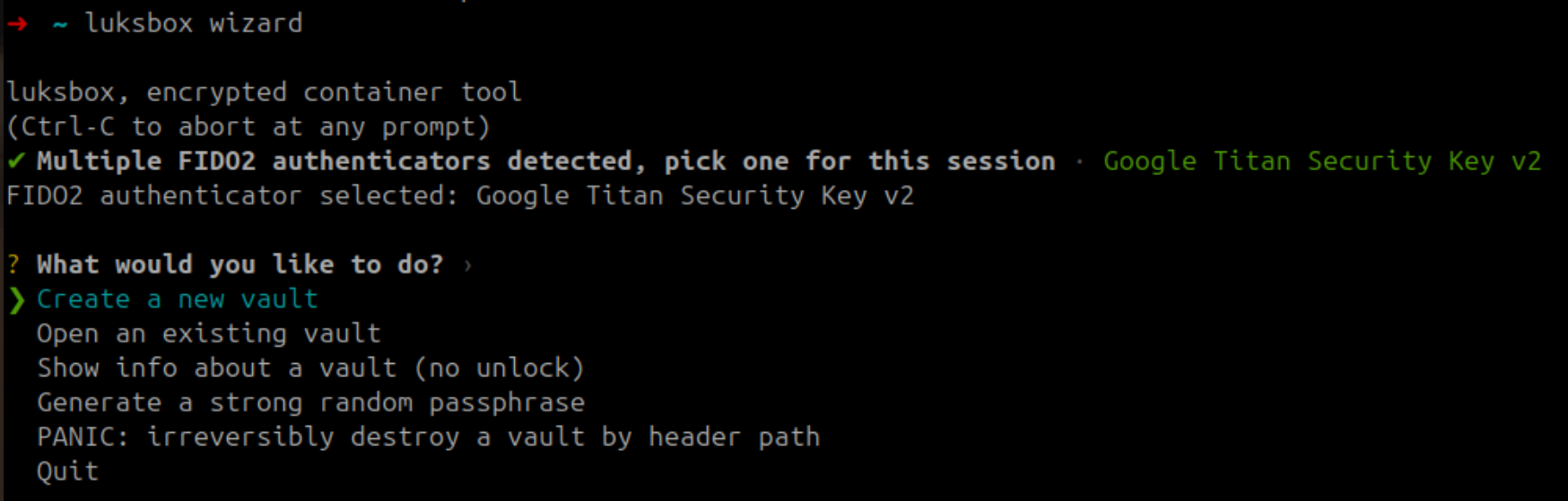
2. Create a new vault, keyslot kind picker
The Create flow asks first what keyslot kind the new vault should use. The list is grouped by factor (passphrase, FIDO2, TPM, hybrid PQ); each entry has a one-line explanation of what it gives you.
3. Create a new vault, cipher + KDF presets
After the keyslot kind, the wizard asks for the AEAD cipher
(default: AES-256-GCM-SIV) and the Argon2id preset
(interactive ~ 540 ms / unlock, sensitive ~ 3-4 s / unlock).
Both have inline explanations.
4. Strong-passphrase generator
When the wizard needs a new passphrase, it offers to generate one for you (about 99 bits of OsRng entropy, formatted as space-separated words for typability). The generated passphrase is shown once with a "WRITE THIS DOWN" banner; the wizard refuses to proceed until you confirm you've copied it.
5. FIDO2 enrollment, touch prompt
If you chose a FIDO2 or hybrid-FIDO2 slot, the wizard prompts you to touch the authenticator. The CLI underneath uses libfido2 on Linux/macOS or webauthn.dll on Windows.
6. TPM enrollment, bootstrap warning
For any TPM-bootstrap kind, the wizard surfaces a recovery warning
before creating the vault and requires explicit Continue? [y/N]
confirmation. After enrolment, the wizard offers to add a passphrase
backup keyslot in the same flow (recommended).
7. Post-create slot summary
Once the vault is created, the wizard prints the slot table, slot index, kind, AAD version, salt fingerprint. This makes the "recovery passphrase at index 1, primary at index 0" layout visible.
8. Open an existing vault, auto-detection
Open prompts only for the path; the wizard reads the header, lists the populated slots, and asks which one you want to use. If a detached header / hybrid sidecar / anchor file lives next to the vault with the conventional naming, the wizard auto-detects them and asks to confirm.
9. Post-unlock manage-keyslots menu
Once unlocked, the wizard exposes a manage-keyslots sub-menu:
- Add a passphrase keyslot
- Add a FIDO2 keyslot (with or without PIN)
- Add a TPM 2.0 keyslot (no PIN, with PIN, fused TPM+FIDO2, hybrid TPM+PQ x4)
- Update an existing slot's parameters
- Revoke a slot (asks for explicit
slot Nconfirmation) - Rotate the MVK (re-wraps every active slot under a new MVK; asks for confirmation; offers backup-first prompt)
- Back to the main menu
10. Anchor verification
The wizard's anchor-check action compares the current vault
generation against the .anchor sidecar (which lives on separate
trusted storage). Mismatch reports rollback with the on-disk vs
anchor generation numbers.
11. TPM permission diagnostic (Linux)
If the wizard detects /dev/tpmrm0 exists but isn't readable by the
current user, it explains the tss-group / udev fix and offers to
print the exact commands. The same diagnostic appears in
luksbox info and at first failure of any TPM operation.
12. Mount flow, eager-flush prompt
Both the open-and-mount path and the post-create mount path ask one durability question right before mounting:
Eager flush? (every metadata op crash-durable on return; SLOW on
vaults with thousands of files -- default is no) [y/N]
- No (default, Enter): mounted with deferred flush. Tree mutations return as soon as the in-memory state is updated; a background timer persists changes every 30 seconds. Fast on large vaults.
- Yes: mounted with
--sync. Every metadata mutation is flushed to disk before the syscall returns, restoring pre-v0.2.2 per-op durability. Cost scales with total file count; expect basic operations (rm,cp -r) to slow down dramatically on vaults with thousands of files.
The CLI equivalent is luksbox mount --sync (see the
mount page
for the full trade-off). The GUI equivalent is the
Eager flush (--sync) checkbox in the Browser view. Default is
"no" in all three surfaces; the prompt does not persist (you'll
be asked again on the next mount).
A host crash without explicit fsync can lose up to 30 seconds
of metadata changes in the default deferred mode. The on-disk
encrypted bytes that ARE flushed remain crash-consistent thanks
to the v0.2.2 durability fence, so partial-crash damage is
bounded to "the last batch of unfinished mutations" rather than
"a vault that no longer opens".